
Clipboard history on Mac, searchable in seconds.
Keep copied text, links, images, files and code within reach. Choose a list or tiles, bring two filtered views together and find content by tag or source app.
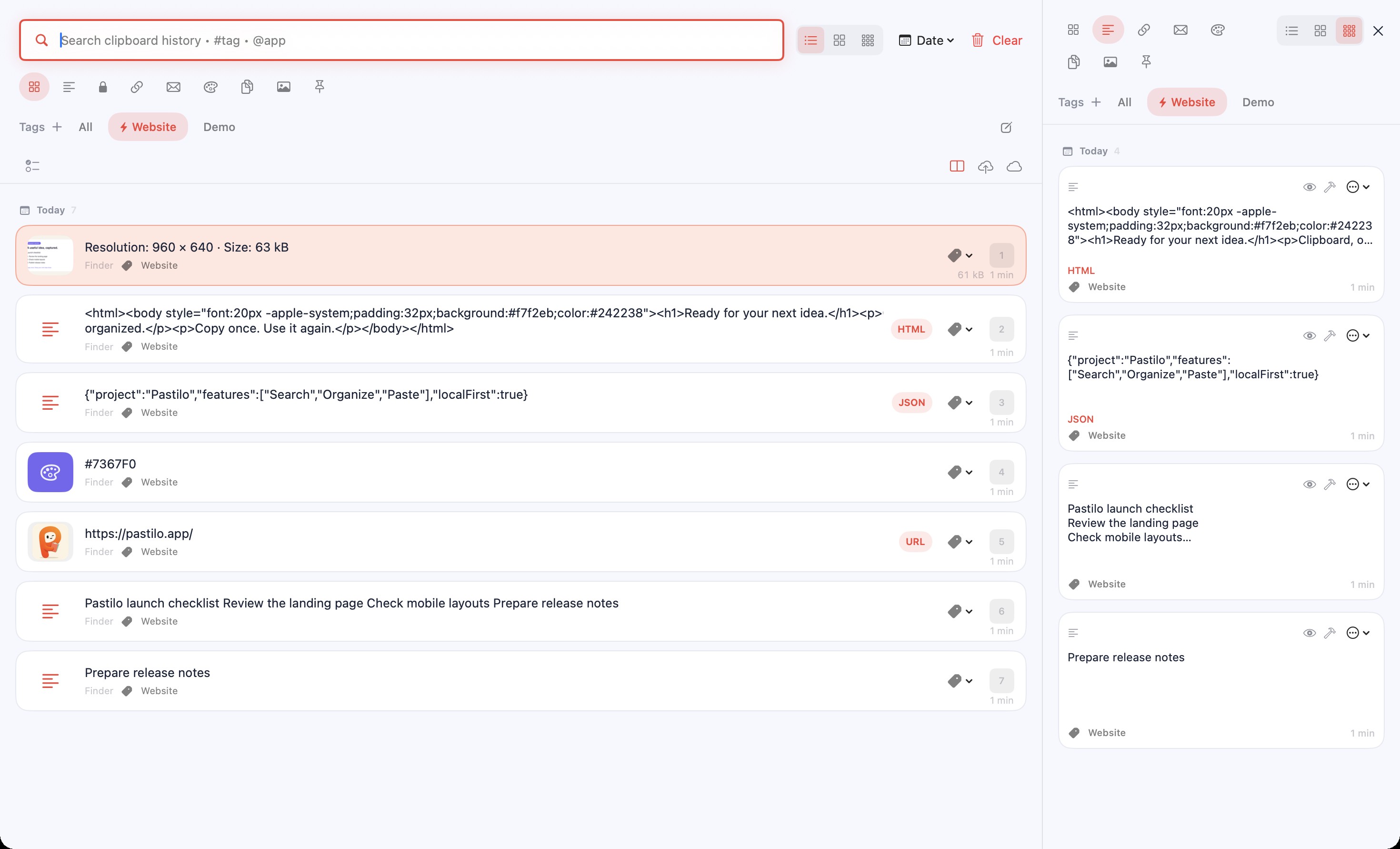
Keep the right context beside your work.
Use one column for the links you are collecting and another for the text you need to paste. Each has its own layout and filters, while one search works across both.
Download Pastilo- Switch between lists and tilesChoose a list, large tiles or small tiles. The second history column can use a different view.
- Collect with a session autotagChoose one tag and new local copies receive it automatically until you turn autotagging off or quit Pastilo.
- Search by tag and sourceTry
#project @safari invoice. Every search condition must match. Selected tag chips match any of the chosen tags. - Combine your filtersSelect several content types or tags. Each history column keeps its own filters; search, sorting and date grouping are shared.
- Recognize links before opening themEnable optional website thumbnails, then use Open Link from a preview or item menu. The website is contacted to load the thumbnail.
- Keep useful items closePin recurring snippets, preview images and colors and inspect text statistics or entry sizes before using them.
A project tag, from the first copy.
Turn on an autotag for your project, copy a few references, then search with #project @safari. Turn it off when you move to another task. You can still add or remove tags manually.
Lists, tiles and the second column change how you browse your history. They do not create a second collection of clipboard data.
One project tag. Every new copy.
Choose a tag, turn on Autotag, then copy. New local items receive the tag automatically until you switch it off.
Your clipboard remembers the work.
You keep moving.
Clipboard history questions
Does clipboard history leave my Mac?
Local history works without a Pastilo account or cloud sync. If you choose to send an entry through optional iCloud, it is stored in your own iCloud account. See the Privacy Policy.
What can Pastilo remember?
Pastilo keeps copied text, rich text, links, images, files and code with previews suited to each type. Newly copied text above 10 MB is not added to history.
Are the two columns separate clipboards?
No. They are two views of the same history with separate layouts and type or tag filters. Search, sorting and date grouping are shared. Secure items are not shown in the second column.
Does autotagging apply to imported items?
No. Autotagging applies to new local copies, including copied tool results. Archive and iCloud imports do not receive the autotag. Quitting Pastilo switches autotagging off.
How do I open the history?
Use ⌘ Shift V or open Pastilo from the menu bar. Every edition offers direct paste shortcuts ⌥ 1–9.
Make your clipboard easier to reuse.
Start with the Free edition and keep your history within reach.